Index NetMail: Mail Server and Client

NetMail: E-Mail via LAN, GSM, ISDN, Modem E-mail in a LAN - Access your mails and dates from any PC in the network
Mobile mail
- Use NetMail's mobile client via modem, ISDN or TCP/IP
Web interface - Mail and SMS even with PDAs, Linux, Mac using a browser
Server-based - Mails are stored on your server and can be read at any PC
Spam filter
- Intelligent filters suppress spam mails, Trojans and viruses
SMS gateway - With XL version e-mail to SMS and also SMS to e-mail
Popup window - displays new e-mail, current dates and system messages
Check it out! - Free Light version with full functionality for up to 3 users: Download

Free for up to 3 users, 83.19 ¤ excl. VAT for full version [Order] - Shamrock Software, +49 8137 5882

NetMail features

NetMail is a server-based e-mail system for network workstations, consisting of a mail/SMS gateway and a Windows client. Alternatively a webmail interface can be used with any HTML browser. The software can also be combined with CapiFax and CapiCall to form a Unified Messaging System (UMS).

LAN In your
office
In a local-area office network, NetMail offers groupware functions like e-mail, SMS, dates, pinboard and instant messaging. Thanks to the integrated webmail interface, non-Windows computers can use an HTML browser to read and write e-mails. Or build your own HTML-based Intranet with NetMail's HTTP server.
GSM, SMS Mobile
e-mail
Even when you are not in your office, you have access to your e-mails. Using the mobile NetMail client, you can dial your server via ISDN, TCP/IP, GSM, GPRS or UMTS. Since NetMail uses a highly optimized and compressed protocol, the connection cost is minimized. Typically the transfer cost is less than 50 % compared to conventional e-mail programs.
Fax-to-Mail, Mail-to-Fax, Speech-to-Mail Unified
messaging
NetMail can access the Windows/Outlook address book (WAB). Together with CapiFax and CapiCall it can form a Unified Messaging System (UMS) so that voice mails or faxes can be forwarded as e-mails, or to send e-mails to fax numbers. Using a GSM modem like the TC35i even mail to SMS and SMS to mail is possible.
Software All you
need
A shared calendar, private and shared mail archives, a keyword-driven personal autoresponder, MAPI support for third-party programs, automatic sending of files at specified times by e-mail (e.g. log files) and many other features are built into NetMail. Check out the free add-ons also, like an SMTP module for direct e-mail reception.

Compare for yourself!

The following table compares NetMail with a conventional e-mail program like Outlook Express. Most of the Outlook features are also true for other programs like Microsoft Mail, Netscape Messenger, Lotus Notes, cc:Mail, Tobit David, Eudora, Pegasus Mail and so on.

NetMail compared to a conventional e-mail program Outlook NetMail
Gateway and
LAN clients
Internet via POP3/SMTPEmail for all workstations
Access your e-mails from any workstation
SMS transmission/reception integrated
Webmail interface for Linux/Mac/Win-CE etc.
Receive e-mails directly with SMTP module
Spam filter with score rules (fuzzy logic)
Heuristic virus/Trojan filter
Reject unwanted e-mails with "user unknown"
Automatic printout of new mails at the server
no
no
no
no
no
no
no
no
yes
yes
yes
yes
yes
yes
yes
yes
Mobile/
external client
Mobile e-mail
Modem/ISDN
Data rate for text file via GSM with 9600 bps
Online compression of data transfer
Full-duplex transfer (simult. send/receive)
Continue transfer after connection break
Unnecessary header lines not transferred
Switch English/German at any time
1 KB/s
no
no
no
no
no
2 KB/s
yes
yes
yes
yes
yes

NetMail components

NetMail consists of two main components - the client software which can be used in a LAN or also externally e.g. via GSM to read and write e-mails, and the gateway software running on a PC in your office. The LAN clients are not installed separately on each workstation but loaded over the network neighbourhood (autosync.exe) from the NetMail folder.

Internet
World
--POP3->
<-SMTP-
NetMail gateway PC NetMail clients Cellphone
LAN
Mailer
mailer.exe
->
<-
Mail
router

gateway.exe

-- Transfer
host32.exe
-GSM/ISDN/TCP-
Mobile clients
- - - - - - - - - - - -Network - - -
LAN clients
    -- SMS
capisms.exe
<--> SMSSMS

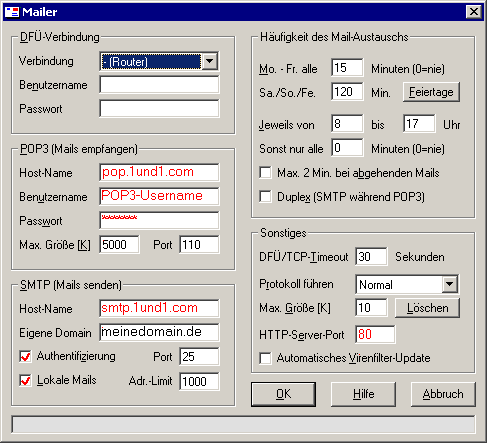
The gateway software consists of four programs. The mailer typically fetches all e-mails from a catch-all POP3 account at your Internet provider and sends your e-mails using SMTP. The mail router places the fetched mails into personal mailboxes, using the To/Cc/Bcc header lines. The SMS module allows sending and receiving SMS messages. The transfer module is only required on the server if mobile NetMail clients are used.

NetMail versions

The free NetMail Light can be used for up to three users (i.e. the part of your e-mail addresses in front of @), but you can create as many alias names as you want, e.g. info, webmaster, postmaster and so on.

NetMail- Light XL
Windows client and web interface
Maximum number of NetMail users
Mobile clients via GSM and ISDN
Automatic virus filter update
Send SMS via HTTP provider
Send SMS with a GSM modem
Receive SMS with a GSM modem
Max. number of alias names
Max. addr. in distribution lists
Price excl. VAT
yes
3
yes
no
no
no
no
no limit
10
free
yes
1000
yes
yes
yes
yes
yes
no limit
no limit
83.19 ¤
> Download Order
Client
Windows client (English/German)

HTTP interface
Web interface (English/German)

Download NetMail

The free NetMail Light is limited to 3 users and does not support a GSM modem for SMS. The clients can be used in a LAN or externally via ISDN, modem or GSM (not via satellite - see SkyFile for this application).

Server
You will need administrative privileges for installing NetMail. Unpack netmail.zip into an empty temporary folder like c:\Temp and launch SETUP. It installs NetMail into another folder like c:\Shamrock\NetMail. Please click on "Yes" if Windows asks if you really want to install it. The temporary folder can be deleted later.

LAN clients
If you use the NetMail client on LAN workstations, you do not need to install it separately. Simply launch autosync.exe from the server's NetMail folder via the network neighbourhood.

Mobile clients
Use SETUPM to install the mobile client on external PCs outside of your office LAN.

NetMail can be uninstalled using the Windows control panel (Software - NetMail).

Download Download - 3 MB, English/German. Some functions require that you have an own domain. Please also read the following paragraph "Installation in 10 minutes". Please note: NetMail cannot be used as a mail server for Outlook or similar programs since it comes with its own client software.

Installation in 10 minutes

First of all, you should create a catch-all POP3 account at your Internet service provider. All other POP3 accounts must either be deleted or redirected to the catch-all account.

On the gateway PC, simply follow these steps:
- Unpack NetMail.ZIP into an empty temporary folder, e.g. c:\Windows\Temp (not applicable for CD).
- Launch the SETUP program, select English as language, and install NetMail e.g. to c:\NetMail.
- For LAN clients, the gateway's hard disk (typically C:) must be accessible as a network share (read+write).
- Launch the gateway configuration from the Windows start menu (Programs/NetMail).
- Enter your own main domain, e.g. mydomain.com, and (if applicable) additional domains.
- Create at least one user in the configuration program (username = address part before @).
- Launch "Mailer" and "Mail router" using the windows start menu, they must run always!
- Open the Mailer configuration menu and enter the settings for RAS, POP3, and SMTP.
- If required at the server, you can start the NetMail client using the Windows start menu.
- Select "Own e-mail address" in the client configuration menu to choose a username.

In the gateway PC, at least mailer.exe (Mailer) and gateway.exe (Mail router) must run all the time.
System tray of gateway PC: Systray   R=mail router (gateway.exe), M=mailer (mailer.exe)

On the other network workstations, please follow these steps:
- Create a desktop link to autosync.exe on the server, e.g. to \\server\c\netmail\autosync.exe
- Click on this link to launch the NetMail client program.
- Select "Own e-mail address" in the client configuration menu to choose a username.

Free add-ons

Some free add-on utilities are available for NetMail:

SMTP server for mail reception (ZIP 16 K, doc)
Terminal server support for popup program (ZIP 27 K, doc)
DynDNS/RAS utility for IP updating and keep-alive (ZIP 12 K, doc)
RSS feed reader with HTML output (ZIP 24 K, doc)
RS2File for sending RS232 data as e-mail (ZIP 60 K, doc)