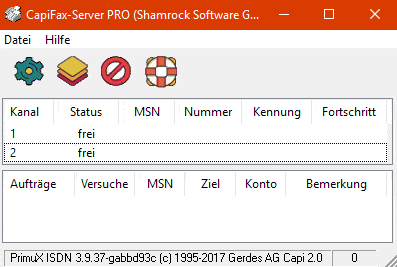
Server-based
Sends/receives faxes via a central fax server
Network clients
Allows private fax numbers for persons or divisions
Connection types
Use with ISDN or VOIP connections
Fax to E-Mail
Forward received fax documents as TIF or PDF e-mails
E-Mail to Fax
In combination with NetMail you can send mails with attachments as a fax
Mail merge
Supports the mailing function of most Office programs
Pickup directory
Send PDF and Word documents automatically from a source directory
iFax-Funktion
sends faxes as e-mail attachment (T.37) or via fax gateway
Up to 60 channels
Two versions for up to 8 (Pro) or 60 (S2M) channels
LAN or terminal server
Universal fax server for normal network workstations and terminal server clients such as Citrix, Windows servers, etc.
Network Fax Server for Windows
CapiFax is a fax server for all 32 and 64 bit Windows versions.
On an IP connection, you have the following options:
- With the PrimuX-VoIP-CAPIdriver from the company Gerdes one (or more) SIP account can be used directly. There are licenses from 2 to 60 simultaneous connections
- TE-Systems’ XCAPI is ideally suited for connecting to your IP provider. These VOIP driversusually log on to the router or IP PBX.
- The “T.38 CAPI” is a possibility to test CapiFax as a demo immediately. You can find a description here.
- Alternatively, a DSL router with S0 port (e.g. AVM FritzBox 7490, Telekom Speedport 921V) or a PBX for connecting an ISDN adapter is suitable.
Alternatives for ISDN connections:
- Suitable ISDN adapters, depending on the OS and the required channels, are e.g. AVM-Fritz PCI or -USB (2 channels), Primux 1/2/4 S0 (2 to 8 channels) or Primux S2M (30 channels, requires CapiFax S2M).
- Also a router with fax gateway e.g. from Lancom or Bintec can be used, e.g. if a virtualization software is used. Some of these offer a direct CAPI interface.
Clients:Each person or division can have a private fax number (MSN/DDI). For transmitted fax documents a private outgoing number is possible. Automatic printing of received and/or transmitted faxes is supported. Besides normal network workstations, even terminal server clients can be used.
Fax to mail: Depending on the called number or the caller’s number you can easily define if and to which address received faxes are forwarded by e-mail as PDF or TIF attachment, e.g. to Microsoft Exchange or any other SMTP server.
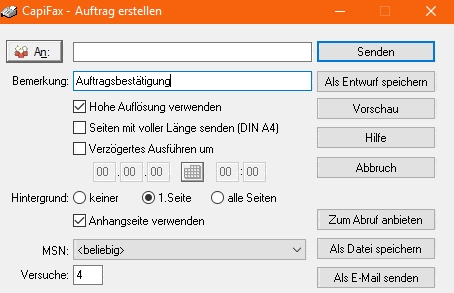
Mail zu Fax: In combination with NetMail you can create a system, which can handle mails like 081379107.fax@ihredomain.de by converting attached files like PDF. Associated programs for PDF, DOCX or similar must be installed. You get a confirmation mail after the fax is sent.
Fax polling:Offer multiple documents for fax polling, one per number (MSN/DDI). In addition it is also possible to deliver different documents depending on the CLIP number or fax ID of the caller, e.g. for offering regional information based on area codes or countries. Fax polling documents can quickly be created using the fax printer driver.

Best price-performance ratio
- Unlimited network users without expensive additional licenses – transmission, reception, fax polling, fax to mail for your complete network.
- Server-based– all fax and log files are kept on the server so that a centralized backup is easy
- Up to 8 or 60 channelsfor reception and transmission with affordable hardware (e.g. Primux 4S0 or Primux S2M)
- Create PDF files from received or sent fax documents without any additional third-party software (Fax to PDF).
- Application interface with documented file formats, e.g. for interfacing with a web server or for customer-specified applications.
- Automatic number detection from your program interface for example by OCR
- Mailings can easily be sent using the standard mail-merge function of common office programs like Word or OpenOffice.
- Automatic backup copies all transmissions in a second destination.
- ISDN-or IP-properties like logging of calling numbers (CLIP) or suppressing the local outgoing number (CLIR) are supported.
- Delayed transmission by entering a transmit time in the printer driver dialogue, e.g. during the night for using cheap tariffs.
- Robinson list for numbers to which faxes should never be sent.
- State of server can be seen on clients
- Address book with up to 32 groups; a fax can easily be sent to one or several groups or to selected addresses.
- Create draftsfor checking a fax by someone else before it is actually sent.
- Anti-spam functionoptionally allows rejecting faxes which do not have a proper ID, or coming from blacklisted numbers.
- Application interface with documented file formats, e.g. for interfacing with a web server or for customer-specified applications.
- Can be run as a service – so the fax server works even if no Windows user is logged in.
- Excellent supportby emailor by telephone (+49 8137 5882) No call center but direct and competent answers from the developers!
- Best price-performance ratiofor fax server software says PC Professionell, a reputable German PC magazine.
- Thousands of users are the best confirmation of a great solution.
Demo download
- The CapiFax demo is equivalent to CapiFax Pro and can transmit or receive on up to 8 channels at one time
- It runs for two hours after each program start or for up to 20 send or receive operations, after which calls are not accepted and faxes to be sent are discarded.
- To continue working, however, it is then sufficient to simply restart the fax server program. This also allows you to test or demonstrate the software over a longer period of time, but not to use it unattended for a longer period of time.
- The fax ID is always “Shamrock CapiFax” and cannot be changed in the demo version.
- With “T.38 CAPI” also as demo version you can fully test CapiFax immediately. You can find an example configuration here.
The printer driver and client software is installed by launching SETUP from the CLIENTS subfolder below the CapiFax folder on the server (via the network neighbourhood on other workstations). The software can be switched between English and German at any time using Configuration/Language in the client menu.
Software and manual can be found in the Windows Start menu after installation. View the manualhere and later in (Start menue – Programs – CapiFax)
The required ISDN MSN as your local fax number is displayed at the <of the fax server window (Last call) after a test call.
More tipps and details can be found here.