SkyFile is a Windows program developed by Shamrock Software for time-saving and secure transfer of e-mails via Inmarsat, Iridiumand Thuraya.
Transfer e-mails worldwide quickly, securely and inexpensively
It is specially optimized for satellite connections, especially with regard to transmission rate, response time and error correction. The packet size is automatically optimized for the satellite service used.
Data is compressed during transfer using a ZIP-equivalent process; for typical text files, the savings is about 60 percent.
Furthermore, data can be transmitted full-duplex, i.e. in both directions simultaneously. This ensures fast transmission even with unstable connections. After a connection abort, a restart is possible to avoid having to completely retransmit a file that has already been started.
In use worldwide in many languages.
Regardless of the installed Windows language, SkyFile can display a wide variety of character sets, even mixed within one e-mail, e.g. Western European, Russian, Japanese or Chinese, using UTF-8 character encoding. Real-time spell checker for many languages is built into the mail editor. The user interface can be switched between multiple languages at any time.
SkyFile has been one of the most popular satellite-based email programs around for years. You can either use the integrated multilingual mail editor or easily integrate MS Outlook or other mail programs. Also for ship internal communication without satellite.
Since version 12 (November 2021), SkyFile Mail also fully supports HTML mails when sending and receiving. This can be enabled or disabled separately per subaccount to save data.
A solution for all on board, corporate and private messages.
With self-definable subaccounts, several PCs on board can be networked; thus, crew members or passengers can receive their own mail addresses. The costs incurred can optionally be paid via prepaidcards. These subaccounts (=persons) can be easily managed on board with various settings. For example, some addresses may not have the right to receive attachments, this is for security.
It is even possible to define portable mail addresses that can be used unchanged on different ships (MyMail accounts).
Anti Virus, AFT, Billing
SkyFile Mail provides excellent protection against spam and viruses via mail.
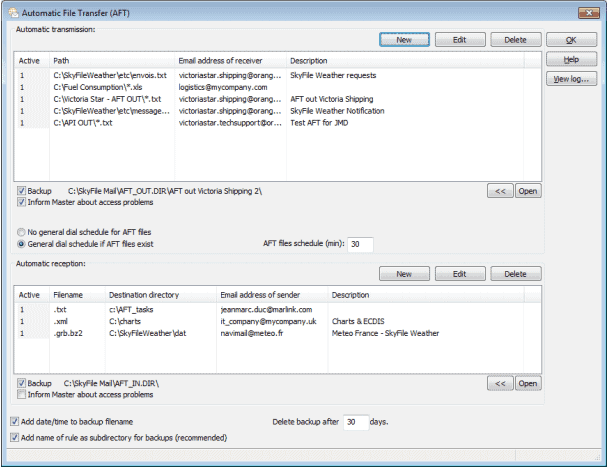
Thanks to AFT (Automatic File Transfer) in both directions, you can automatically provide on-board systems with updates and information and have important status information sent automatically to the control center.
The maximum size of the mails is adjustable to avoid accidentally sending a file that is too large. Macros, e.g. wkr = with kind regards, facilitate the input of frequently used texts.
SkyFile Mail has been developed in cooperation with Marlink and is distributed by Marlink. Support for customers is provided by Marlink Customer Care.